


Custom Packaging Solutions
Premium quality packaging tailored to your brand. From cosmetic boxes to luxury rigid packaging, we deliver excellence since 2010.
This is the title

Hey there, I'm Mike!
What is sublimation printing1?
You want to print vibrant designs on mugs or shirts, but regular ink just peels and cracks. This ruins your product's quality and makes it look cheap.
Sublimation printing uses special ink and heat to turn a design into a gas. This gas permanently embeds itself into the material, creating a vibrant, smooth, and durable image that won't crack or fade easily, becoming one with the product.
<sup id=](https://wansapackaging.com/wp-content/uploads/2025/09/what-is-sublimation-printing-you-wa.jpg) 2 machine transferring a colorful design onto a t-shirt." title="Sublimation Printing Process" />
2 machine transferring a colorful design onto a t-shirt." title="Sublimation Printing Process" />
In my world of packaging, I'm used to giant offset printing3 presses that lay wet ink onto paper to create thousands of boxes. So when I first learned about sublimation, it was like magic. Instead of sitting on top of the material, the ink becomes a part of it. This digital technology opens up a whole new world for creating custom and personalized items. Let's dive into some of the most common questions people have about it.
Is a Cricut a sublimation printer4?
You have a Cricut machine5 and want to make sublimation projects6. You might think you have everything you need, but the process isn't working. This is a very common point of confusion.
No, a Cricut is a smart cutting machine, not a printer. It can perfectly cut designs that have been printed on sublimation paper7, but you still need a separate, dedicated sublimation printer4 to create the initial print.
<sup id=](https://wansapackaging.com/wp-content/uploads/2025/09/is-a-cricut-a-sublimation-printer-.jpg) 5 cutting a design on a sheet of [sublimation paper](https://heyletsmakestuff.com/sublimation-paper-comparison/)7, with a printer nearby." title="Cricut and Sublimation Printer" />
5 cutting a design on a sheet of [sublimation paper](https://heyletsmakestuff.com/sublimation-paper-comparison/)7, with a printer nearby." title="Cricut and Sublimation Printer" />
Think of it as a two-step team project. The printer does one job, and the Cricut does another. You need both a specific type of printer and a heat source, and the Cricut machine5 is a helpful tool that fits in the middle of that process. As a designer who appreciates precision, you'll love what a Cricut adds, but it's important to understand its specific role.
The Sublimation Workflow with a Cricut
To get a clear picture, let's break down the exact steps you would take. It’s a simple production line, just like the ones in my factory, but on your desktop.
- Design: Create your artwork on your computer. This is where you let your creativity shine.
- Print: This is the crucial step. You must print your design using a dedicated sublimation printer4 filled with sublimation ink8 onto sublimation paper7. A regular printer won't work.
- Cut (Optional): If your design has a complex shape and you want a clean edge, this is where your Cricut comes in. You place the printed sublimation paper7 on the Cricut mat and it will cut your design out with perfect precision.
- Press: You take your printed (and cut) design, place it on your sublimation-ready item (like a polyester shirt or a coated mug), and use a heat press2 to apply high temperature and pressure. This is where the ink turns into a gas and the magic happens.
What are the disadvantages of sublimation printing1?
You see the amazing, bright results of sublimation and think it's perfect for everything. But jumping in without knowing the limits can lead to wasted materials, money, and a lot of frustration.
The main disadvantages are that sublimation only works on white or light-colored polyester fabrics9 or special polymer-coated hard surfaces. It does not work on cotton or dark materials, and it cannot print the color white.
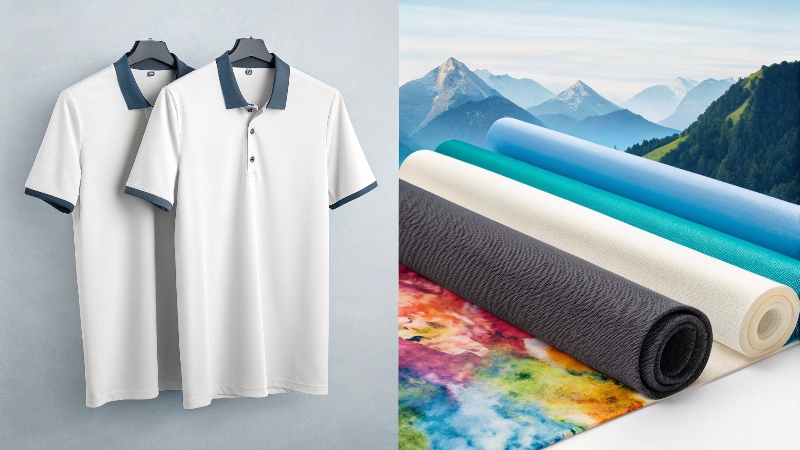
Every production method has tradeoffs, and sublimation is no exception. In my business, choosing the right material and process is critical to success. If you try to print a beautiful design on the wrong material, the result will always be disappointing. It's better to know the limitations before you start so you can plan for success.
Key Limitations to Consider
Before you invest in the equipment, be fully aware of what sublimation can and cannot do.
- Material Restriction: This is the biggest one. The sublimation process10 requires synthetic polymers. This means it works great on 100% polyester fabrics9. For hard goods, they must have a special polymer coating. This is why you can't just grab any ceramic mug from the store; you have to buy "sublimation blanks11." It will not work on natural fibers like 100% cotton.
- Color Limitations: Sublimation ink is transparent. This means a few things. First, you can't print on dark-colored items because the color of the item will show through your design. The process works best on white surfaces. Second, there is no white sublimation ink8. If your design has white in it, that area will simply be left blank, showing the color of the item you are printing on.
- UV Sensitivity: While the print is permanent and won't wash away, it can fade over time if left in direct sunlight continuously. For items that will be used outdoors, this is something to consider.
Can any printer do sublimation?
You want to experiment with sublimation but don't want to buy a new machine. It's tempting to think you can just put sublimation ink8 in your home office printer, but this is a mistake.
No, you absolutely cannot use any printer for sublimation. You need a specific type of inkjet printer that uses a piezo-electric printhead12, and it must be brand new or have only ever been used for sublimation.
<sup id=](https://wansapackaging.com/wp-content/uploads/2025/09/can-any-printer-do-sublimation-you.jpg) 4." title="Choosing a Sublimation Printer" />
4." title="Choosing a Sublimation Printer" />
This is one of the most important rules. In my factory, using the wrong ink in a million-dollar press would be a disaster. The same principle applies here. Using the wrong printer or ink can permanently ruin the machine and will give you zero successful prints. It's a costly mistake that is easy to avoid.
Choosing the Right Printer
So what kind of printer do you need? You have two main options.
- A Converted Inkjet Printer: Some specific models of new inkjet printers, most commonly from Epson (like the EcoTank series), can be used for sublimation. The key is that you have to buy it brand new and fill it with sublimation ink8 from the very beginning. Once regular printer ink has run through the printheads, it is contaminated and cannot be used for sublimation.
- A Purpose-Built Sublimation Printer: Companies like Sawgrass and Brother make printers that are designed from the ground up specifically for sublimation. These are a bit more expensive, but they are easier to set up, often come with software, and have customer support. For someone starting a business, this is often the more reliable path.
No matter which path you choose, you must use it with sublimation ink8 and sublimation paper7. There are no shortcuts.
What is the difference between sublimation printing1 and normal printing?
You've heard terms like "digital" and "offset" and are confused. Understanding this is key to choosing the right process, whether for one t-shirt or thousands of boxes.
Sublimation is a digital process where heat turns ink to gas to fuse it into a surface. Normal printing for mass production, like offset printing3 for boxes, uses plates to transfer wet ink onto paper. They are for completely different purposes.
<sup id=](https://wansapackaging.com/wp-content/uploads/2025/09/what-is-the-difference-between-subli.jpg) 3 press and a small desktop sublimation setup." title="Sublimation vs. Normal Printing" />
3 press and a small desktop sublimation setup." title="Sublimation vs. Normal Printing" />
This question goes to the heart of what I do every day. In the printing industry, we generally have two modes: traditional offset printing3 and digital printing13. Sublimation is a very specialized type of digital printing13.
Two Worlds of Printing: Proofs vs. Production
At my packaging company, we use both types of printing every day. We have a fast, low-cost digital printer that we use for making proofs. We send these proofs to clients so they can check that the text and layout on their box are correct. We don't use it for the final product because, as we know, the color from a simple digital print is not the same as the final color from a big press. It’s just for checking content.
The offset press is for the real production run. It's a huge machine that is expensive to set up for each job. But once it's running, it's incredibly fast and the cost per box is very low. Most importantly, my press operators can adjust the colors on the machine to get a perfect match. With a digital proof, the color is what it is; you can't adjust it. With offset, we can tweak the ink levels until the color is perfect.
| Feature | Offset Printing (Normal for Boxes) | Sublimation (Specialty Digital) |
|---|---|---|
| Process | Wet ink transferred via custom printing plates. | Ink turns to gas with heat and fuses into the material. |
| Color Control | Full control. Colors can be adjusted on the press. | Direct output from file. No color adjustment on press. |
| Best For | High-volume runs (thousands of units) of paper/card. | One-offs & small batches of custom items. |
| Cost | High initial setup cost, but very low cost per unit. | Low setup cost, but high cost per unit. |
| Materials | Paper and paperboard. | Polyester or polymer-coated items only. |
Conclusion
Sublimation is a powerful digital tool for creating custom products. Knowing its unique process, benefits, and important limitations helps you decide if it's the right choice for your next creative project.
Explore the intricacies of sublimation printing to understand its unique process and benefits. ↩
Understand the role of a heat press in transferring designs during sublimation. ↩
Understand the differences between offset and sublimation printing processes. ↩
Get insights on choosing the right sublimation printer for your needs. ↩
Find out how a Cricut machine complements sublimation printing for precise designs. ↩
Get inspired with ideas for unique sublimation projects to showcase your creativity. ↩
Discover the importance of sublimation paper in achieving high-quality prints. ↩
Learn about sublimation ink's properties and why it's essential for vibrant prints. ↩
Explore why polyester is the ideal material for sublimation and its benefits. ↩
Dive deeper into the sublimation process to understand its mechanics. ↩
Learn about sublimation blanks and where to purchase them for your projects. ↩
Learn about the technology behind sublimation printers and its significance. ↩
Explore the relationship between digital printing and sublimation techniques. ↩
More to read
# Which is Better for Packaging Mockups: Laser or Inkjet?
Which is Better for Packaging Mockups: Laser or Inkjet? You need to create a physical
2025 year the most welcome packaging box color trends
This year, packaging trends are making a bold statement with Radiant Red taking the limelight
5 Important Things to Consider for Luxury Products Packaging?
5 Important Things to Consider for Luxury Products Packaging? You've created a premium product, but
